What if Emails are not being received by the Recipients?
When sending an email, you presume that the recipient will receive it. If you learn that they haven't, however, you should take the following actions to investigate:
1) An email cannot be delivered if it is sent to an incorrectly spelled or nonexistent email address. Although it appears obvious, it is frequently neglected.
2) Sending yourself an email via the creation of a New Communication is the second thing you may do to check.
Click New under Communication List.
3) Please reconfigure your email account if the aforementioned procedure doesn't work.
Visit your email account, check your email by opening it, and then click Save if everything appears to be in order. If there is a problem with the Configuration, it will throw an error, which you may then fix.
4) Check email queues for any problems or unsent messages.
Opening that email and scrolling down to the Error area will reveal the error if the state is Error (as in the screenshot below).
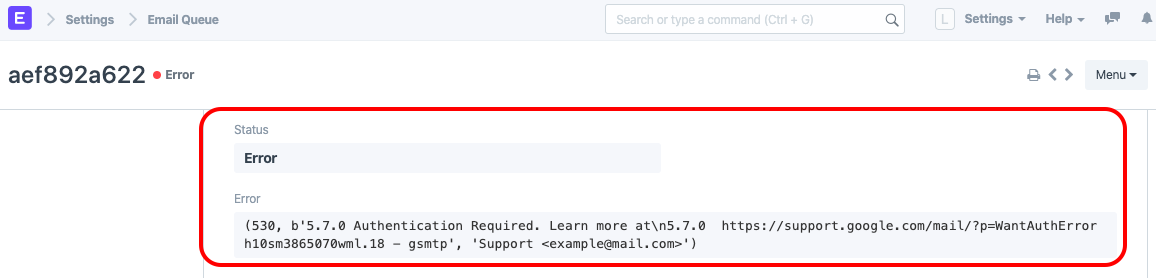
NOTE: The error can differ from what can be seen in the above screenshot.