Leave Encashment
Leave Encashment
When an employee receives money in exchange for leaves they did not use, this is referred to as "leave encashment." For leave types that are cashable, you can file a leave encashment.
Go to: to obtain Leave Encashment.
Home > Human Resources > Leaves > Leave Encashment
1. Prerequisites
The following documents should be made before generating Leave Encashment:
1.Employee
2.Leave Type
3.Leave Policy
4.Leave Period
5.Salary Structure
6.Salary Structure Assignmen
2. How to create a Leave Encashment
1.Click New under the Leave Encashment list.
2.Choose the leave period.
3.Decide on the Employee. The Employee's Department is automatically retrieved once the Employee has been chosen.
4.Choose the Leave Type that the Encashed Leave belongs to. Verify that the leave type can be redeemed (that is, that the "Allow Encashment" checkbox is selected in the leave type).
5.Decide on the Encashment Date. The sum will be encashed in that specific Payroll Entry on the date you choose.
6.Publish and save.
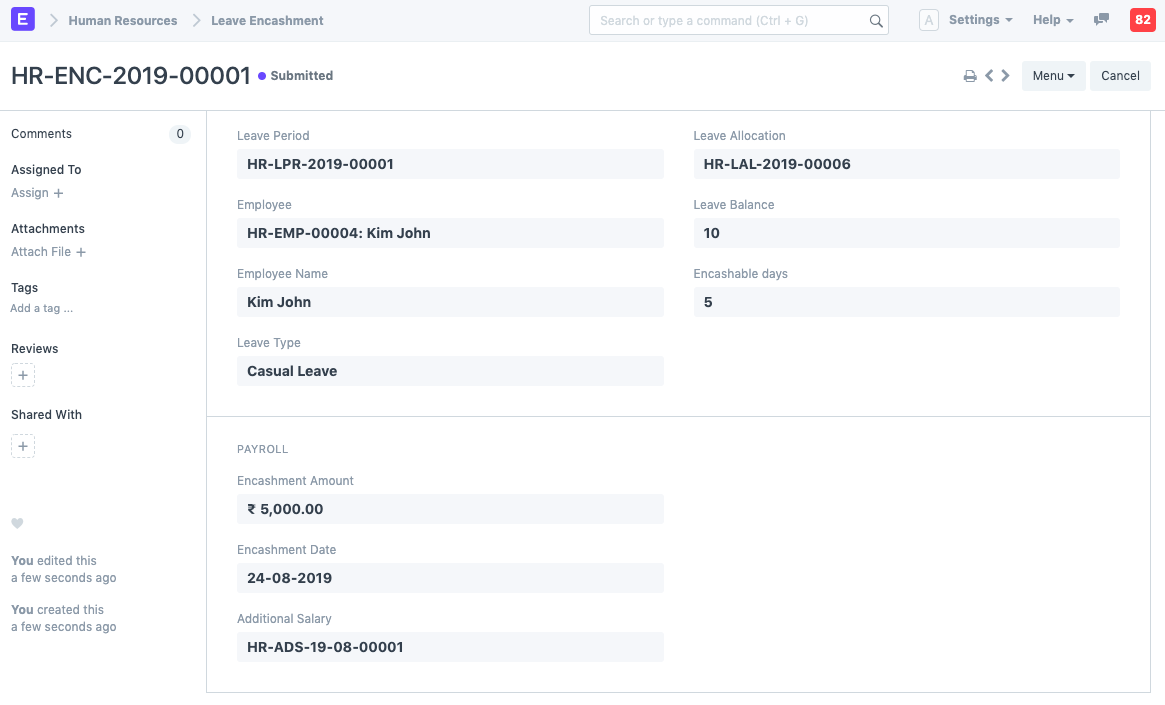
Note: As you choose the Employee and Leave Type, the Encashment Amount based on the Leave Encashment per day as specified in the Employee's assigned Salary Structure will be shown along with the Leave Balance and Encashable Days (which are total leave balance less the threshold days set in Leave Type).
When an employee submits a leave encashment, ERPNext automatically generates an additional salary that will be added to the employee's salary slip during payroll processing.