Permission Error Problems
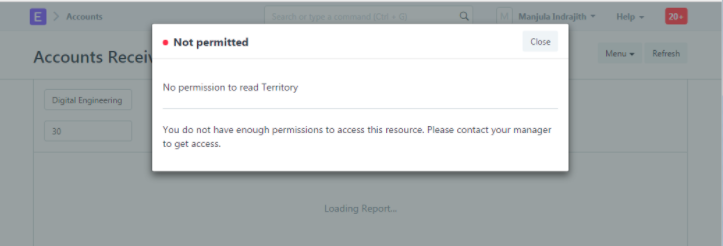
Question: Roles like Account User and Account Manager have been assigned to the user. However, a notice stating that the user does not have permission from the territory master appears while accessing the Account Receivable report.
Answer:
According to Geer ERP's permission system, a user must have at least read permission on every link field in a form or report in order to access it. Please add a permission rule to allow Account User/Manager to have at least Read permission on the Territory master since Territory is a link column in the Account Receivable report. To fix this problem, kindly adhere to the directions listed below.
Account Manager and Account User are the roles given to the User.
The user lacked authority to access the territory master, as shown by the error message. None of the aforementioned roles given to that User have any permissions on the Territory master as per the default permissions.
I've given Account User permission to read the territory master in order to fix this problem.
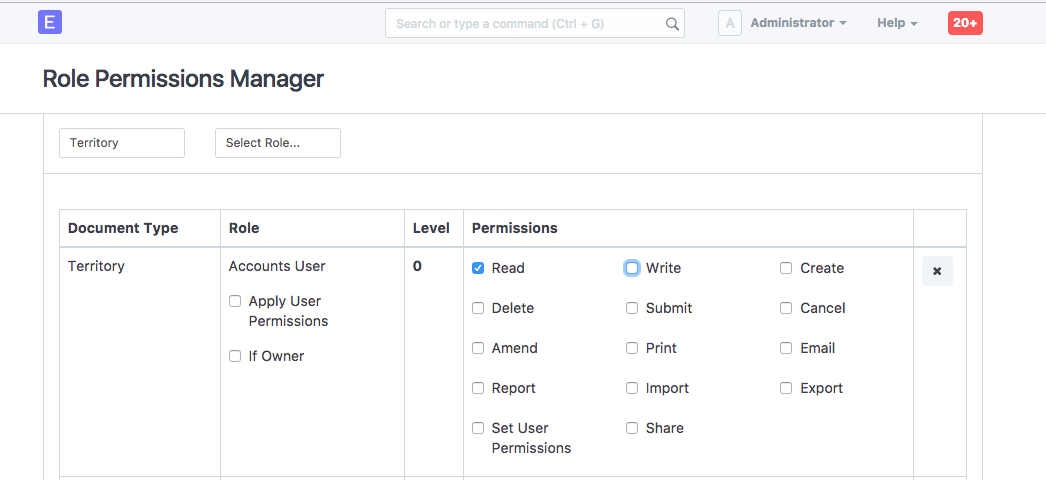
User should have no trouble accessing the Account Receivable report as a result of this permission modification.
