Price Lists
Price Lists
A price list consists of a number of item prices that are either selling, buying, or both.
Using price lists, ERPNext enables you to manage numerous selling and buying item prices.
Price lists can be utilized in situations when there are various prices for various zones (depending on shipping costs), for various currencies, etc. An item may have several pricing that can be stored as several rate plans depending on the customer, currency, region, delivery costs, etc.
All of the item prices are kept distinct in ERPNext. An item's buying price and selling price are different, so they are kept in separate storage bins.
Go to: to access a price list.
Home > Selling/Buying/Stock > Items and Pricing > Price List
1. How to use a Price List
While creating an item price to track the selling or buying price of an item, price lists will be used.
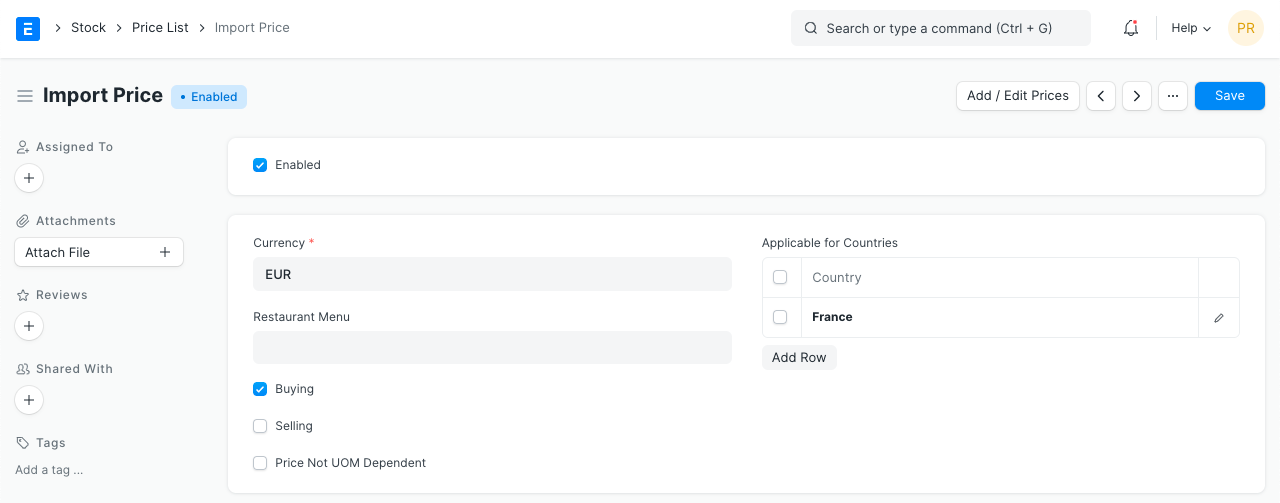
The Price List allows for the assignment of particular nations.
Uncheck the "Enabled" checkbox to remove a certain Price List from the list. In sales and purchase transactions, the disabled price list won't be available for selection.
Consider the example of tomatoes, which you buy in boxes and sell in kilograms. 10 kilograms equal 1 box, and the cost of 1 kilogram is 10 rupees. If you just choose one box in your transaction and this Box is left unchecked, the price will only be displayed for a Kilo because that is the only item price that has been kept.
The price will now be set to 100 if you check this box and conduct a transaction with a box of tomatoes because the cost of 1 box (10 kilos) is 100.
- By default, standard buying and selling price lists are generated.
You can choose a price list or attach it to a customer if you have several price lists (so that it is auto-selected). The Price List will automatically update your item prices.