Deferred Expense
Deferred Expense
A expenditure that has previously been incurred but has not yet been used up is a deferred expense.
When the underlying products or services are consumed, the cost is charged as an expense rather than being recorded as an asset. First recorded as an asset, a deferred expense appears on the balance sheet (usually as a Current Asset, since it is not used as of now and will probably be consumed within one year).
1. Configuring Deferred Accounting
Introduced in Version 13 The following settings will provide you greater control over how you handle your deferred accounting, so you should be aware of them before you begin utilizing deferred accounting.
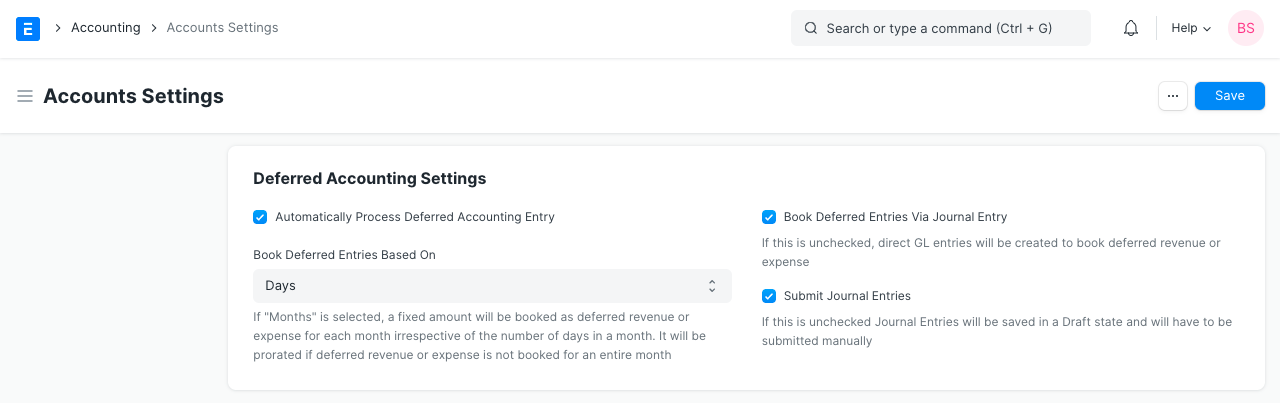
1.Automatically Process Deferred Accounting Entry: This option is turned on by default. You can turn off this setting if you don't want the deferred accounting entries to post automatically. Delayed accounting must be processed manually using Process Deferred Accounting if this setting is disabled.
2.Book Deferred Entries Based On: Based on two factors, the amount of deferred expenses might be booked. "Days" is the pre-selected option here. The amount of the delayed expense will be booked depending on the number of days in each month if "Days" is chosen, or on the number of months if "Months" is chosen. For instance, if the "Days" option is used and a $12,000 expense must be spread over 12 months, $986.30 will be booked for the month with 30 days, and $1019.17 will be booked for the month with 31 days. If "Months" is chosen, $1000 in postponed expenses will be recorded each month, regardless of how many days there are in a month.
3.Book Deferred Entries Via Journal Entry: By default, Ledger Entries are published in order to record deferred expenses against an invoice. This option can be enabled in order to post the postponed amount via journal entry.
4.Submit Journal Entries: Only if deferred accounting items are posted via journal entry is this option relevant. The Diary Entries for deferred posting are retained in Draft state by default; a user must manually verify and submit these items. If this option is turned on, Diary Entries will be submitted without user input automatically.
2. How to use Deferred Expense
Unico Plastics, as an illustration of a deferred expense, pays $10,000 in April for its May rent. It places this expense on hold in the prepaid rent asset account until the time of payment (in April). Unico Plastics deducts from the rent expenditure account and credits the prepaid rent asset account since the prepaid asset has been used up as of May.
*Delayed expenses also include things like:
*Interest expenses that are included in a fixed asset for which they were incurred and capitalized
*Insurance paid up front for protection in upcoming months the price of a fixed asset that is deducted from expenses throughout the course of its useful life
*The expense involved in registering a debt instrument's issuance
*An intangible asset's cost that is amortized over its useful life and allocated to expenses
*The cost of an Internet Membership is up front, and service is provided on a monthly basis. Delayed expense for the customer, thus.
The process can be automated by configuring Delayed Expense accounting in ERPNext as shown below.
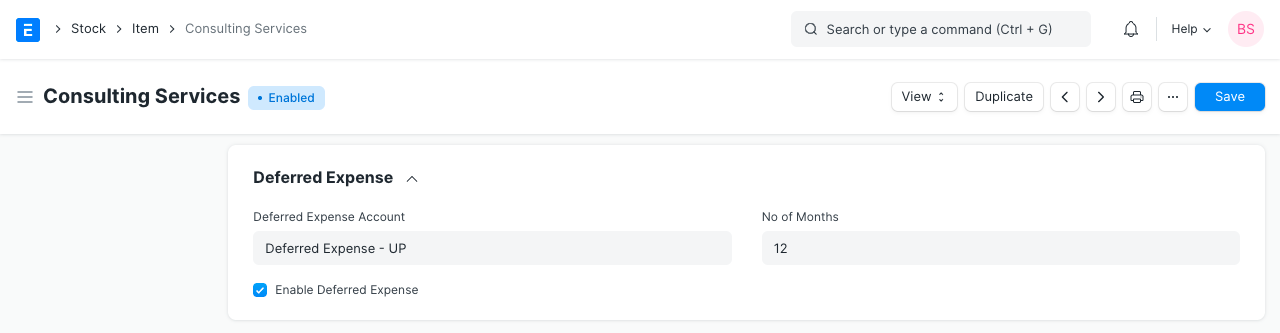
2.1 Item
Check the Enable Deferred Expense field in the Item master's Deferred Expense section. You can also choose a Deferred Expenditure account (Asset Account, ideally Current Asset) for this specific item and the number of months in this area.
2.2 Purchase Invoice
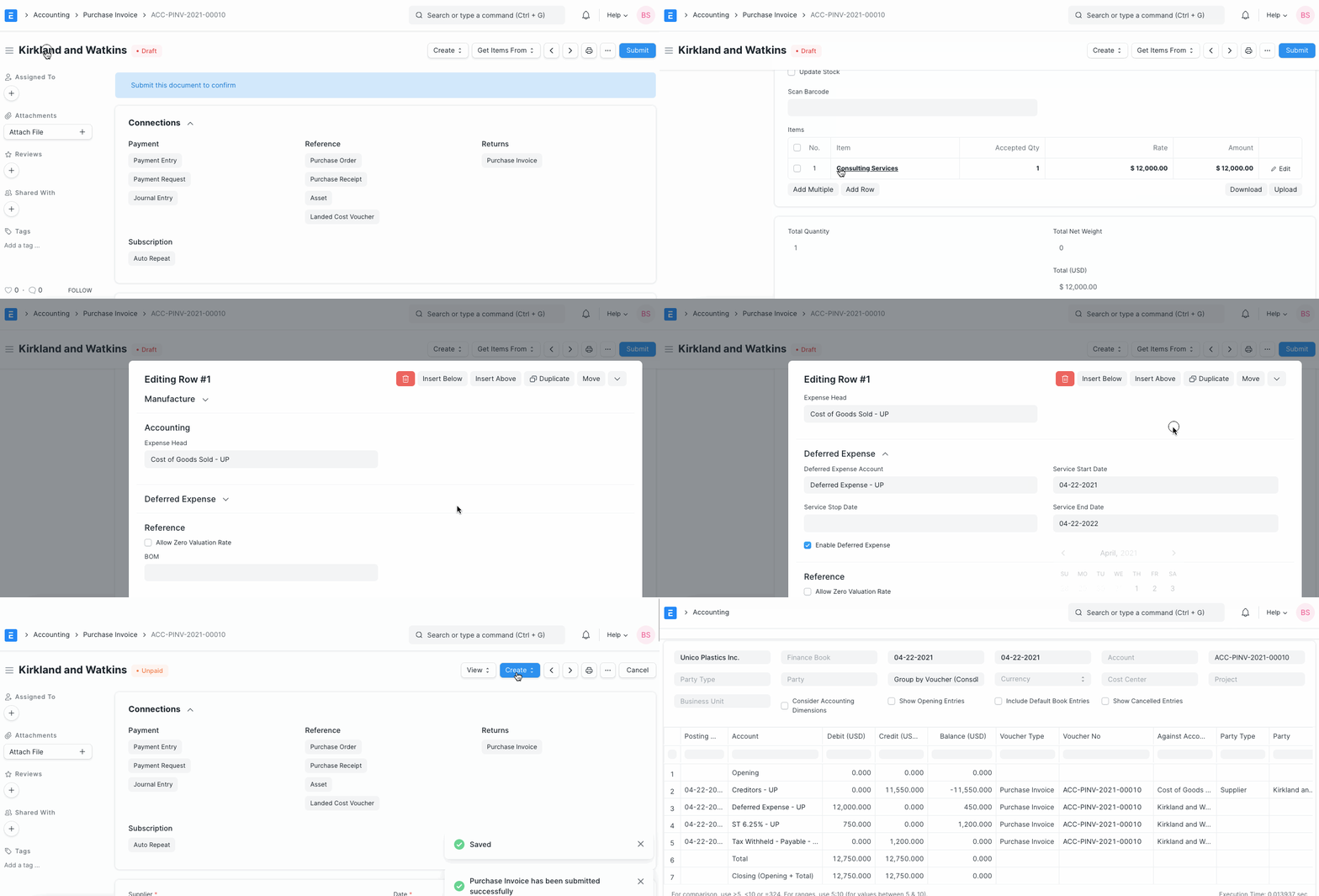
Instead of posting to the expense account when a purchase invoice for a deferred expense item is created, the amount of the purchase is credited to the deferred expense account (Asset account). So, let's take a straightforward illustration of an Internet subscription:
2.3 Journal Entry
Journal Entries are generated automatically at the end of every month based on the From Date and To Date specified in the Purchase Invoice Item table. It credits the chosen expense account for an item in the purchase invoice and debits the sum from the deferred expense account.