Appraisal
Appraisal
A performance assessment is a tool used to record and assess an employee's work performance.
You may handle employee appraisals in ERPNext by establishing an appraisal template for each role with the performance-defining elements and assigning the proper weight to each parameter.
Go to: to access Appraisal.
Human Resources > Performance > Appraisal
1. Prerequisites
Make sure to have the following things ready before creating an appraisal:
- Employee
2. How to create an Appraisal
Got to: New > Appraisal.
The appraisal template should be chosen. Make an appraisal template if one hasn't been made yet. Input the Key Result Areas (KRAs) and their weighted averages, as well as the name of the appraisal template.

Choose the Employee, Start Date, and End Date after choosing the Appraisal Template.
The KRAs will be retrieved in the Goals section based on the template chosen. Give each Question a score between 0 and 5. For each KRA, the Score Earned will be determined based on the specified weightage.
Publish and save.
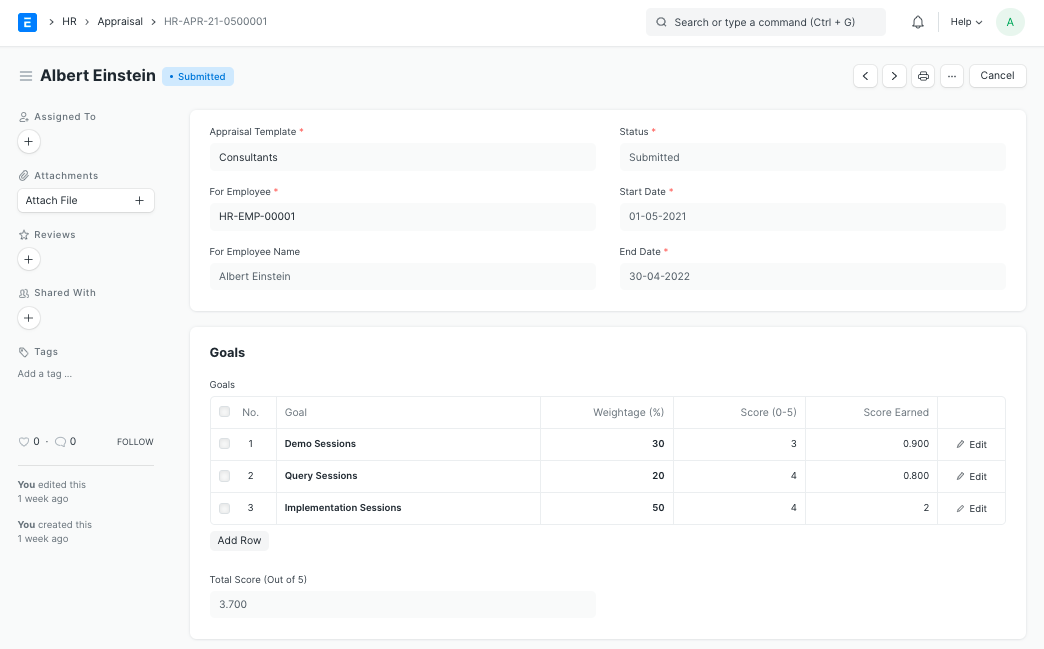
The system will determine the Employee's Overall Score (out of 5) based on the scores entered for each KRA.