Employee
Employee
Your Employee is a person who holds acknowledged rights and obligations to your business while working either part- or full-time in accordance with a contract of employment.
You can control the Employee master in ERPNext. It records the employee's demographic, personal and professional information, joining and leaving information, etc.
Go to: to access the Employee master.
Home > Human Resources > Employee
1. Prerequisites
The following should be created before creating an employee:
Employment Type
Job Applicant
Employee Department
Employee Grade
Employee Branch
Employee Designation
Leave Policy
Holiday List
Leave Encashment
Shift Type
Employee Health Insurance
2. How to create an Employee
1.Click New from the Employee list.
2.Insert the employee's personal information, including name, gender, birthdate, and joining date.
3.Save.
2. How to create an Employee
1.Click New from the Employee list.
2.Insert the employee's personal information, including name, gender, birthdate, and joining date.
3.Save.
All of the required fields are underlined in the image below.
3. Features
In addition to the mandatory information given above, the Employee master can also store the following information:
3.1 Employment Type
An employee's employment type can be set to be something like Intern, Contract, Full-time, Part-Time, Probation, etc.
3.2 Create ERPNext User
The User ID and the Employee may be connected. If the User ID has not yet been created, you can create one by selecting "Create a New User" from the dropdown menu.
You can limit the Employee's access to other records by selecting the "Create User Permission" checkbox. To discover how to add users and permissions, visit Adding Users.
3.3 Joining Details
The employee's joining information can be recorded, including the offer date, confirmation date, contract end date, notice period (in days), and retirement date.
3.4 Department and Grade
Workers in a corporation are typically divided into departments, grades, designations, and branches.
This information about the Employee can be preserved in the Department and Grade area. The individual to whom the Employee must report his obligations can be noted in the "Reports to" column.
3.5 Leave Details
You can preserve the specifics of the Leave Policy and Holiday List in Leave Details. Holiday List is a list that comprises the dates of holidays and weekly offs, whereas Leave Policy specifies the kind and quantity of leaves to which an Employee is entitled.
3.6 Salary Details
Here, the method of salary payment—bank, check, or cash—can be chosen.
3.7 Contact Details
Here, you can record the contact information for an employee, including their phone number, current address, and both personal and business email addresses. Depending on the user's option, the Corporate Email, Personal Email, or User ID of the Employee can be chosen in the Preferred Email ID area.
3.8 Personal Details
Personal information about the employee, such as family background information like parent, spouse, and kid names and occupations, passport information like issue date and location, and health information like height, weight, allergies, and medical problems, among others, can be saved.
3.9 Educational Qualification
Here, the employee's educational information, including their school or university, level, and year of graduation, can be saved as illustrated below:
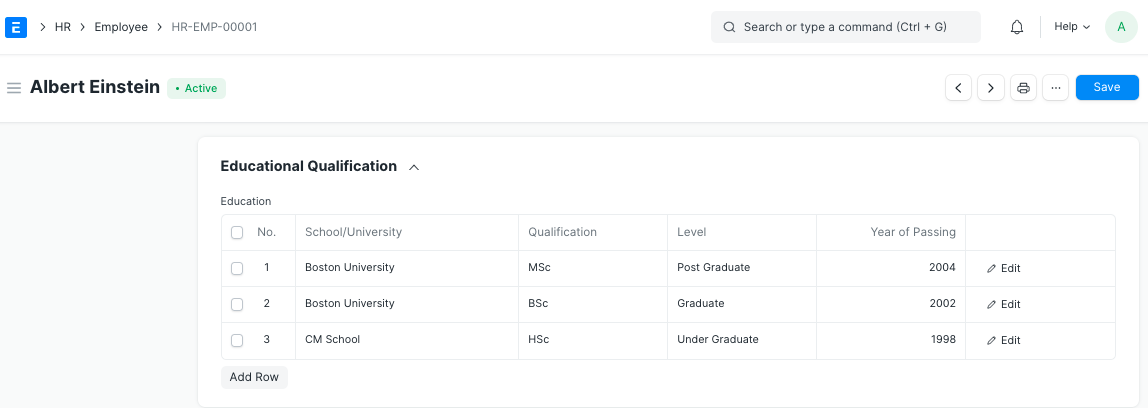
The Education table's downward arrow can be used to record additional information like Class/Percentage and Topics.
3.10 Previous Work Experience
Similar to educational qualifications, an employee's prior employment history can be recorded in the table for external work history, as seen below:
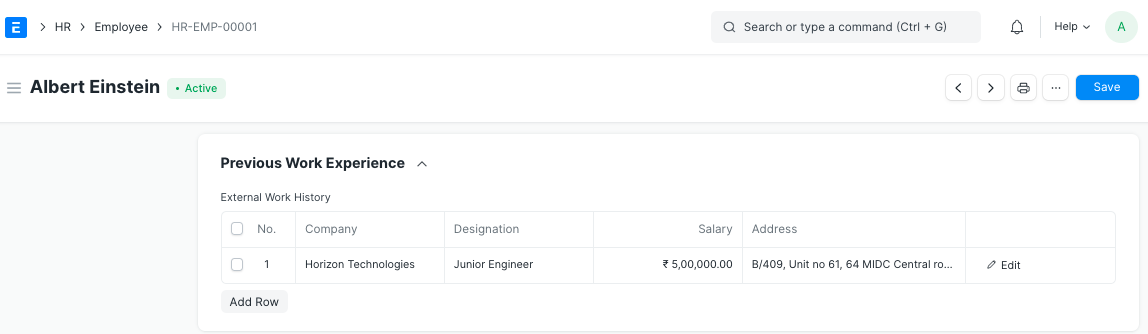
Moreover, information like Contact from the prior employer and Total Years of Experience can be stored in the External Work History table.
3.11 Exit
It is possible to save an employee's exit information, including details of their resignation, exit interview, and leave encashment. The Relieving Date must be filled in if the employee's status is set to "Left."
When an employee's status is changed to "Left," that specific employee master will no longer be usable in subsequent transactions.
3.12 Additional Features
The following are some extra features that are part of the Employee master:
Emergency Contact
Health Insurance
Personal Bio
History in the Company