Leave Policy
Leave Policy
The term "Leave Policy" refers to the number of authorized leaves granted to an employee by a company during a leave period.
Several businesses follow the standard practice of enforcing a broad leave policy in order to efficiently track and manage employee departures. You can design and manage numerous leave policies using ERPNext, and you can assign leaves to Employees in accordance with the policies.
Go to: to access the leave policy.
Home > Human Resources > Leaves > Leave Policy
1. How to create a Leave Policy
1.Click New under the list of leave policies.
2.Enter the Yearly Allocation after choosing the Leave Type.
3.Publish and save.
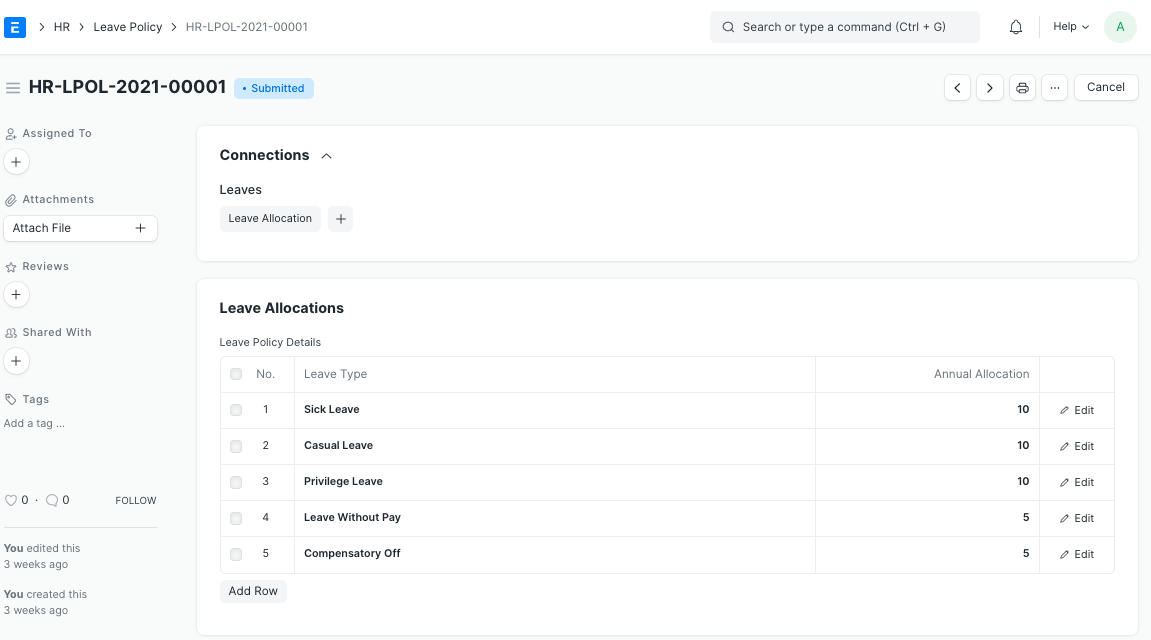
Once it has been filed, you may use the dashboard to apply the Leave Policy to either an Employee or an Employee Grade.
All leave allocations for employees in this grade will be in accordance with the Leave Policy after a Leave Policy has been issued to the employee grade. You can tag the Leave Policy in the Employee master under the "Attendance and Leave Information" section if you need to selectively alter it for a specific Employee.