Asset Category
An Asset Category classifies different assets of a Company.
Making an Asset Category based on the type of assets is the first step in asset management. Your entire collection of desktops and laptops, for instance, could fall under the "Electronic Equipment" Asset Category.
You can choose a default depreciation method, periodicity, and depreciation-related accounts in the asset category that will be used for all the assets in the category.
Note: You can also set default depreciation-related Accounts and Cost Centers in Company master.
Go to: to see the Asset Category list.
Home > Asset > Assets > Asset Category
1. How to create an Asset Category
- Give the Asset Category a name.
- If you want to keep track of assets under a temporary balance sheet account instead of the corresponding asset account, check the "Enable Capital Work in Progress Accounting" box. Please visit this page to learn more.
- Save.
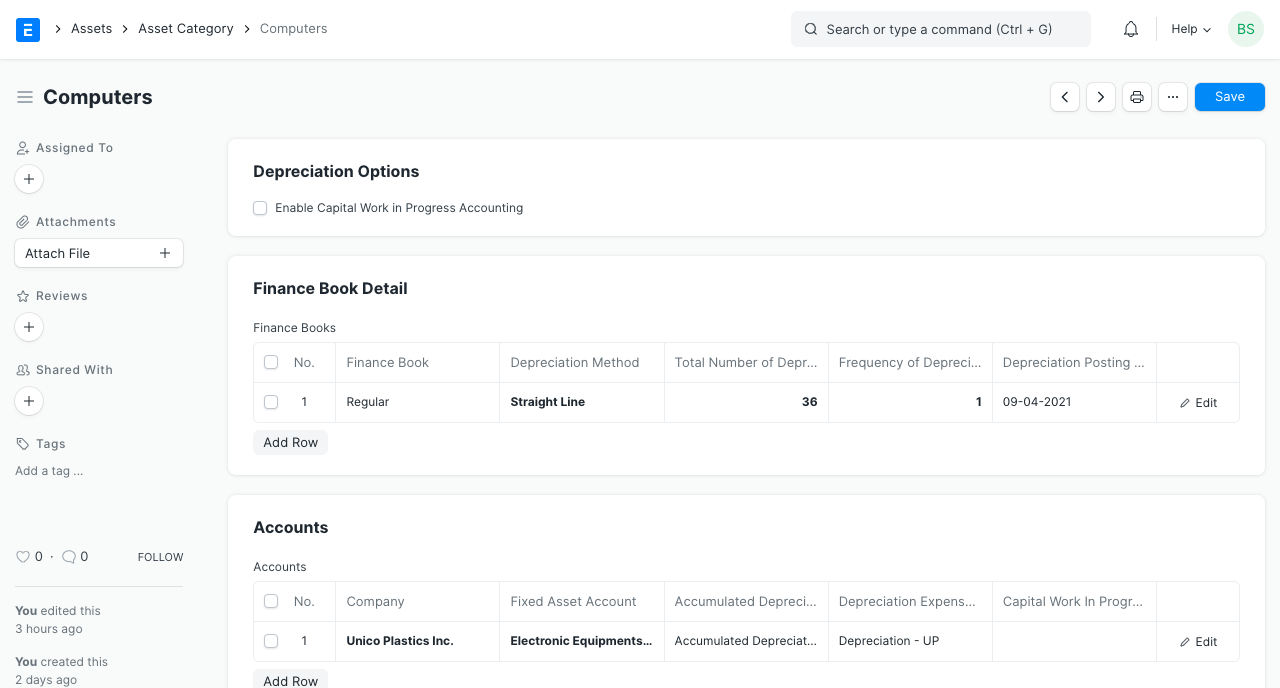
1.1 Additional options when creating an Asset Category
- Enable Capital Work in Progress Accounting: When enabled, the Capital Work in Progress accounts are updated with the accounting entries for the category's non-used assets. This occurs if you possess the asset but haven't used it yet, meaning that the "Available for Use Date" is set at a later time. Disable this function if you instantly spend all of your resources. When this is disabled, CWIP accounting will not be performed.
2. Features
2.1 Finance Book details
If you report depreciation in a number of various ways, you can link a finance book. You can fill out the fields below:
- Depreciation Method: To record the depreciation of assets in this category, select a depreciated method. Please visit this page to learn more.
- Frequency of Depreciation (Months): The duration of time during which depreciation will be recorded. After this time, the asset might be destroyed.
- Total Number of Depreciations: the number of depreciations that will be scheduled within the chosen time period.
- Rate of Depreciation: the depreciation rate that was used within the chosen time frame. Based on the depreciation method chosen, this will be computed.
2.2 Accounting Details
The following account details can be set to record asset values in the ledger:
- Company
- Fixed Asset Account
- Accumulated Depreciation Account
- Depreciation Expense Account
- Capital Work In Progress Account