Job Opening
Job Opening
A Job Opening is a job vacancy in your Company. You can make a record of the open vacancies in your company using Job Opening.
ERPNext enables you to schedule hiring for your business. According to the openings anticipated by the Staffing Plan established for the organization or one of its parent group firms in the hierarchy, you are only permitted to generate a certain number of Job Openings for a Designation.
Note: Ensure the Hiring Settings section of the HR Settings has the "Check Vacancies On Job Offer Creation" checkbox selected.
Go to: to access Job Opening.
Home > Human Resources > Employment Opportunities
1. Prerequisites
It is advised that you first create the following before creating a job opening:
- Staffing Plan
- Department
2. How to create a Job Opening
1.Navigate to the Job Openings list and select New.
2.Type the job title here.
3.Choose the Department and Designation. The relevant Staffing Plan and Intended Number of Jobs will be obtained based on the Designation option.
4.Save.
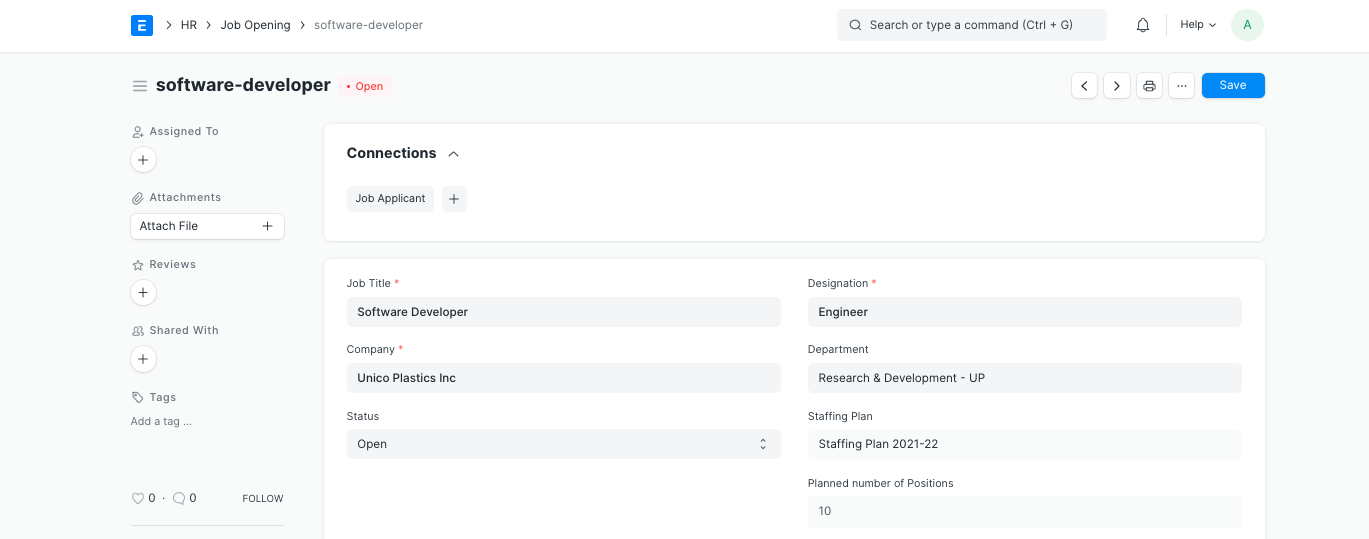
You can immediately create a new Job Applicant from the dashboard after saving the Job Opening.
You can choose to make the job opening's status Open or Closed. You cannot create a job applicant against a closed job opening.