Current Exchange
Currency Exchange
ERPNext's Currency Exchange form keeps track of currency rates that users manually enter. By default, ERPNext fetched the most recent market-based currency rates for all currencies. However, you can save and use preset exchange rates. To use the exchange rates saved in the Currency Exchange form, you must enable "Allow Stale Exchange Rates" in Accounts Settings.
Go to: to access the Currency Exchange list.
Home > Accounting > Multi Currency > Currency Exchange
1. How to create a Currency Exchange
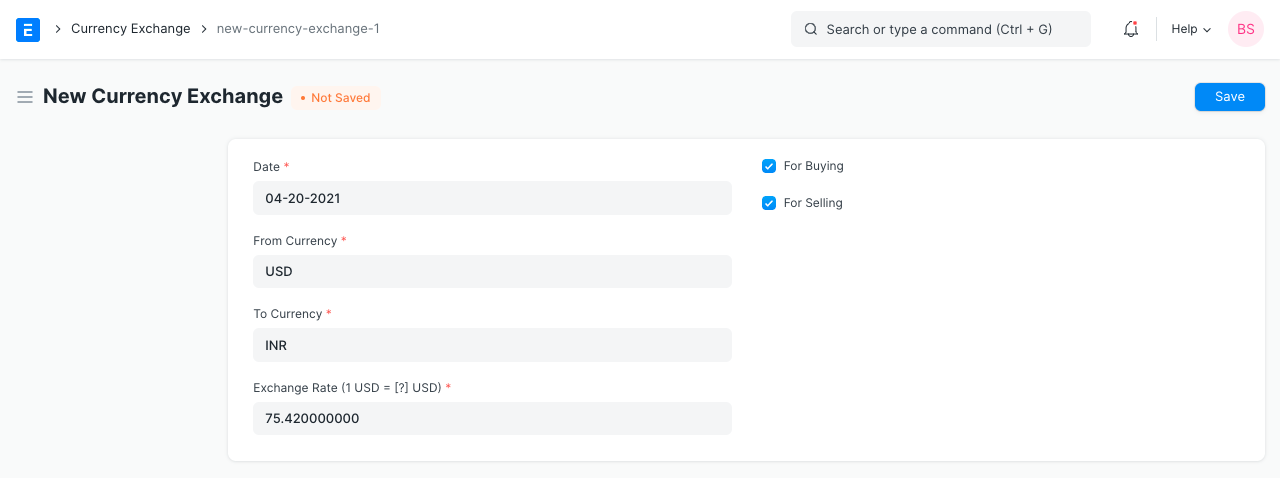
1.Go to the Currency Exchange list and click on New.
2.Enter a date from which this exchange rate will be valid. New Currency Exchange forms saved with newer dates will be used in transactions.
3.Set the From and To currency.
4.Enter the Exchange Rate, for example, 1 USD = 65 INR.
5.Select whether the exchange rate applies to selling, buying, or both transactions.
6.Save.