Include Tax or Charge in Valuation or Total?
Include Tax or Charge in Valuation or Total?
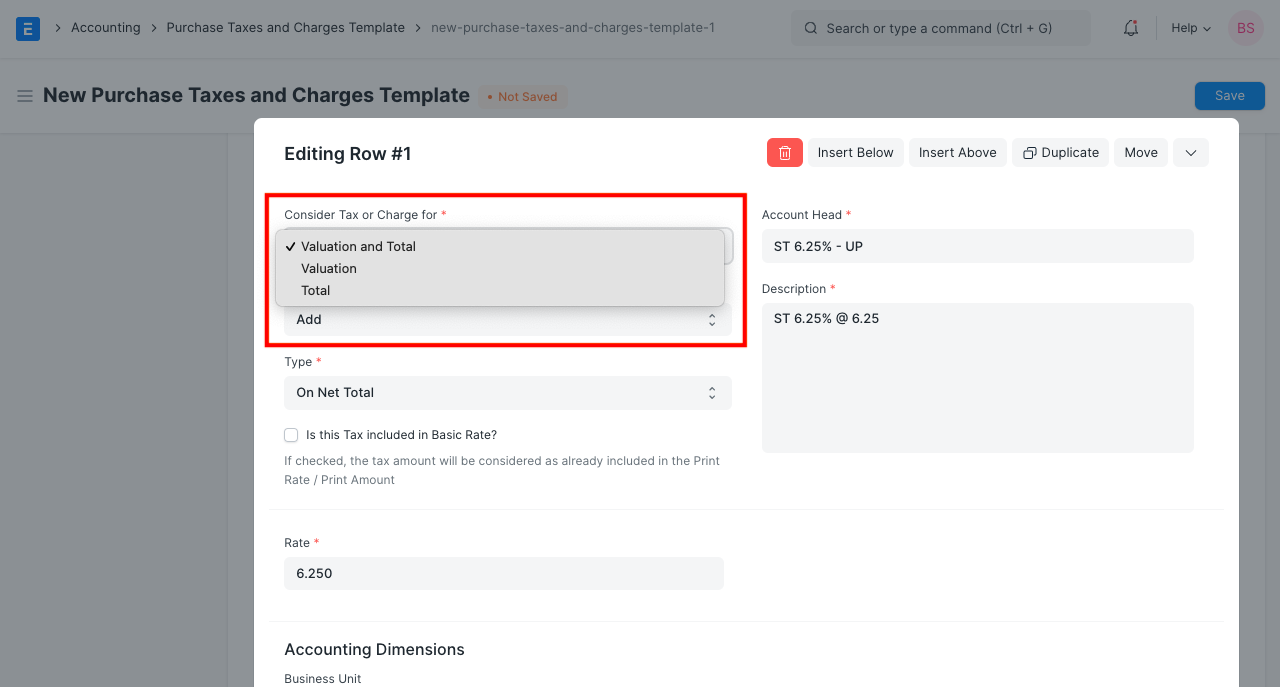
Consider Tax or Charge has three possible values in the Taxes and Charges table of purchase or sale transactions.
1.Total
2.Valuation
3.Total and Estimate
Consider an example to comprehend the effect of each type of charge. We purchase ten items at a price of $800 per unit. The total amount spent is $800. A 4% VAT is applied to the item purchased, and 100 INR was spent on transportation.
Total: Tax or Fee categorized as Total will be added to purchase transactions' totals. However, it will not affect the value of the item purchased.
If 4% VAT is applied to an item, its price will be INR 32 (at the item's base rate of 800). Since VAT is a consumption tax, it should be added to the Purchase Order/Invoice total, as it will be included in the amount due to the supplier. But it should not be added to the price of the item that was purchased.
When the Purchase Invoice is submitted, the tax/charge categorized as Total will be posted to the general ledger.
Valuation: Taxes or fees classified as Valuation will be added to the price of an item, but not to the total of the transaction.
A transportation fee of 100 INR should be classified as a valuation. This will increase the value of the purchased item from 800 to 900. Additionally, this fee will not be added to the purchase total because it is your expense and should not be reflected to the vendor.
Check here for details on the general posting of expenses classified as Valuation.
Total and Valuation: Tax or Charge categorized as for Total and Valuation will be added to both the item's value and the purchase transaction totals.
Assume that our supplier has arranged transportation, but that we must pay transportation costs to them. In this case, the category for transportation fees should be Total and Valuation. With this, a transport fee of INR 100 will be added to the actual purchase price of INR 800. Also, 100 INR will be added to the total, as it is payable to the supplier.