Packing Slip
Packing Slip
The items in a shipment are listed on a packing slip.
Typically, it is delivered with the items.
Several Packing Slips can be produced from a single Delivery Note. When the shipment is packed in various boxes, it is helpful. The weight and quantity of the items in each box are variables. For instance, if you are delivering 20 chairs in 4 boxes, each box can hold 5 chairs and have a unique packing slip.
Go here: to retrieve the list of packing slips.
Home > Stock > Tools > Packing Slip
Note: In order to create Packing Slips from a Delivery Note, the Delivery Note needs to be in the Draft stage.
1. Prerequisites
It is suggested that you first create the following before making and using a packing slip:
- Delivery Note
2. How to create a new Packing Slip
If you want to manually construct a Packing Slip, follow these instructions. Normally, you should produce a Packing Slip from a Delivery Note when it is in the Draft stage.
Click New from the Packing Slip list.
Choose the Delivery Note option.
The From Package No. from this packing slip should be entered.
To retrieve the Items and Quantities into the Items database, click the Get Items button.
Save.
If you produce the Packing Slip from the Delivery Note, the majority of these facts will be retrieved.
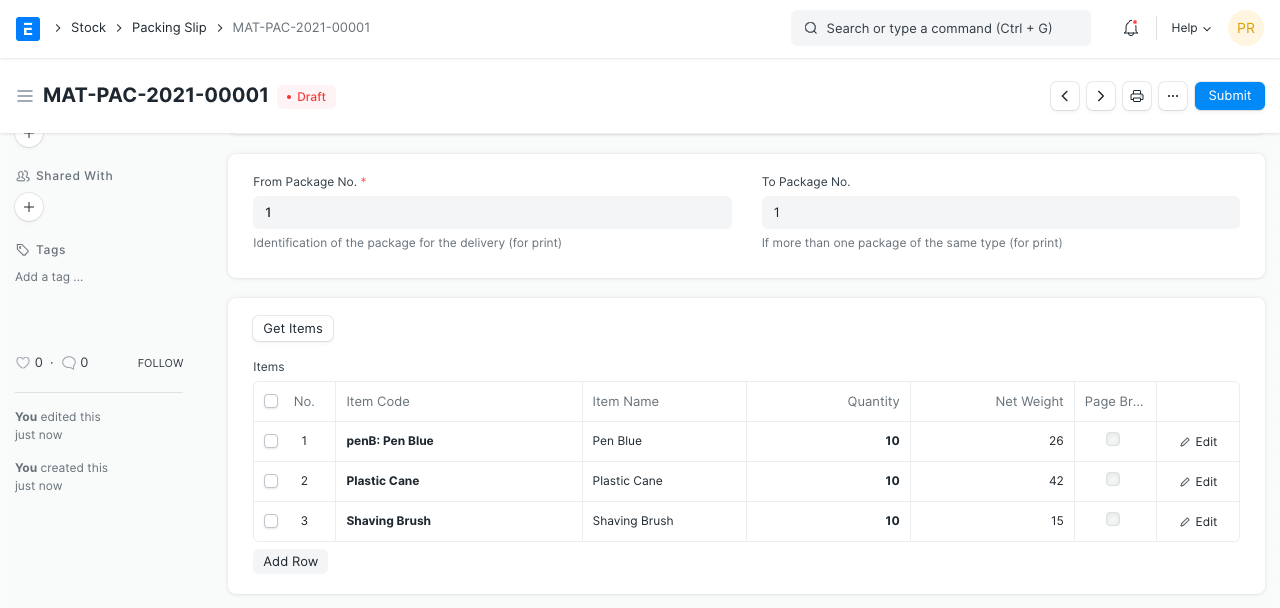
1.1 Additional options when creating a Packing Slip
Set the From and To Package numbers if there are many shipments of the same type that need to be dispatched at once. As an illustration, place packages 1 through 5 on one Packing Slip, 6 through 10 on the next, and so forth. Should you print the packing slip, this will be displayed. Keep in mind that this will only be effective if your shipment contains that many items in that quantity.
2. Features
2.1 Items table
You must choose the Batch Number if this is a Batched Item.
The Delivery Note will be used to retrieve the Quantity, UoM, Net Weight, and Weight UoM.
When printing, Page Break will insert a page break just before this item.
2.2 Package weight details
The Packing Slip will be printed with these specifics.
Net Weight: The weighted average of all the table's items is used to determine this. Gross Weight: The ultimate weight, which includes the weight of the packing supplies used, is known as the total weight. Gross Weight UOM: A UoM for the product's final weight can be placed here.
2.3 Letterhead
Your packing slip can be printed on the letterhead for your business. Learn more here.