Easy steps to set up Workflow
A Workflow can be established when a corporation requires many levels of clearance for a document.
Go to Workflow list --> Create New --> in Geer ERP. Name the process and specif
- States
Transition rules.
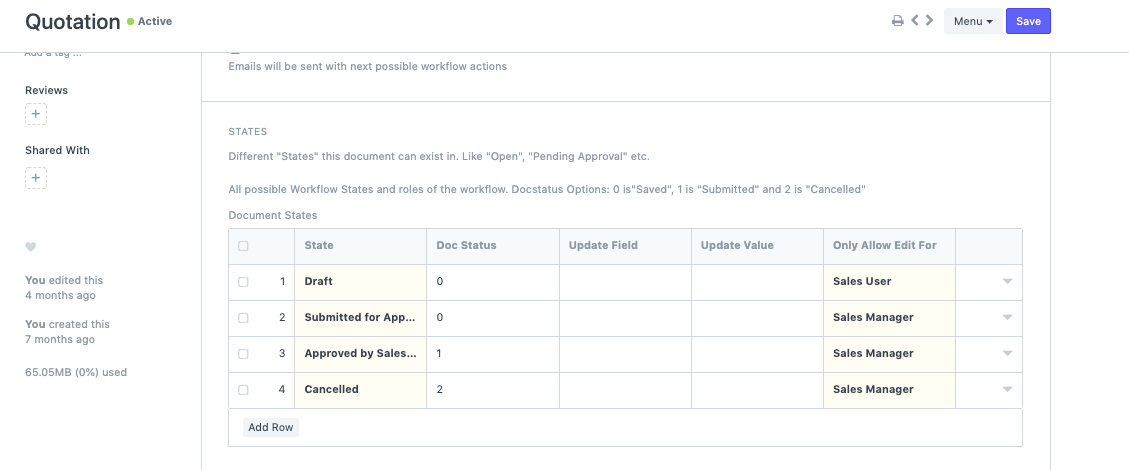
- States :
There are defined states at each level for the role of the user when a document is sent for various levels of approval.
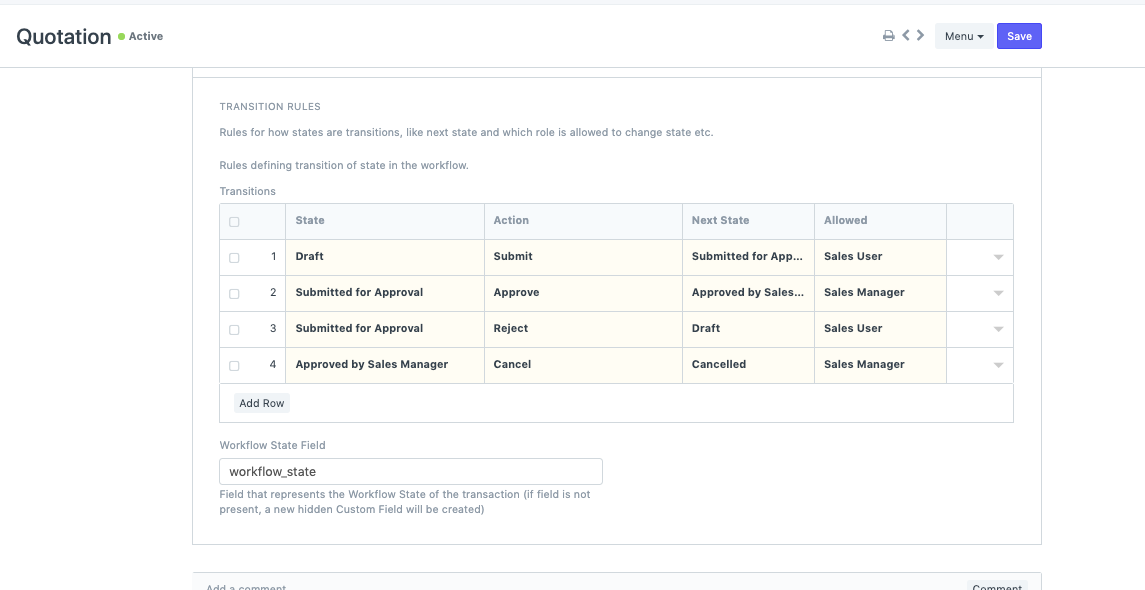
- Transition Rules :
A Sales user can only create Quotations, and they can only be saved in the Draft state. It can also be forwarded to the Sales Manager for approval, where the user assigned to this job will have the authority to Accept or Reject the quotation. If rejected, the quotation will then either be sent to the Draft State or the final Approved state.
Error Messages:
A document cannot be Cancelled before it is Submitted.
Users who describe the state of the Document as Cancelled Before Submission frequently make mistakes like this. The State with Doc Status 2 should only be defined in the Transition after the State with Doc Status 1, as Doc Status 1 specifies that the Document will be submitted at that State.]
Create a Basic Workflow to start, and then let us know what you think about Workflows in general! We adore seeing our users smile!