Material Request
Material Request
A Material Request is a straightforward document that specifies the need for a certain set of Items (goods or services).
The following objectives may be achieved by a material request:
Purchase: if the specified material needs to be bought.
Material Transfer: if moving the needed items from one warehouse to another is necessary.
Material Issue: If the required material will be used for manufacturing, for example.
Manufacture: if the requested material is going to be created.
Customer Provided: if the customer is required to supply the necessary stuff. Visit the Customer Submitted Item page for further information.
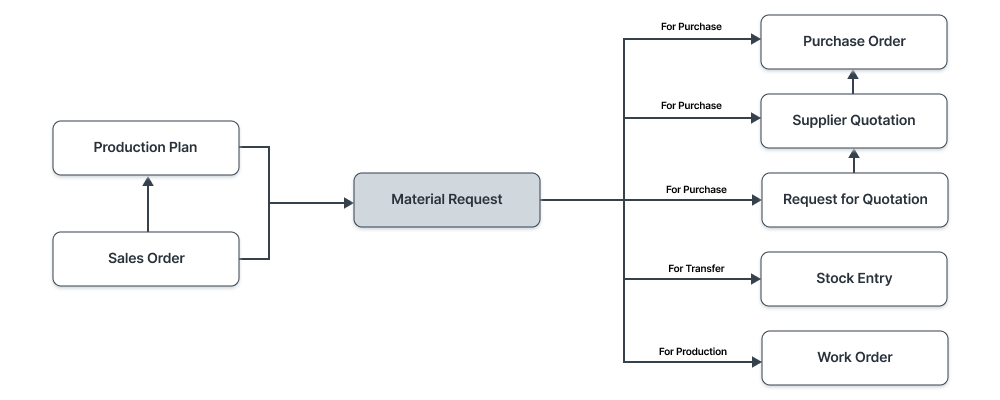
To access the Material Request list, go to:
Home > Stock > Stock Transactions > Material Request
1. How to create a Material Request
Click New on the Material Request list.
The due date should be entered.
Choose from one of the aforementioned purposes.
From a BOM, sales order, or product bundle, you can fetch items.
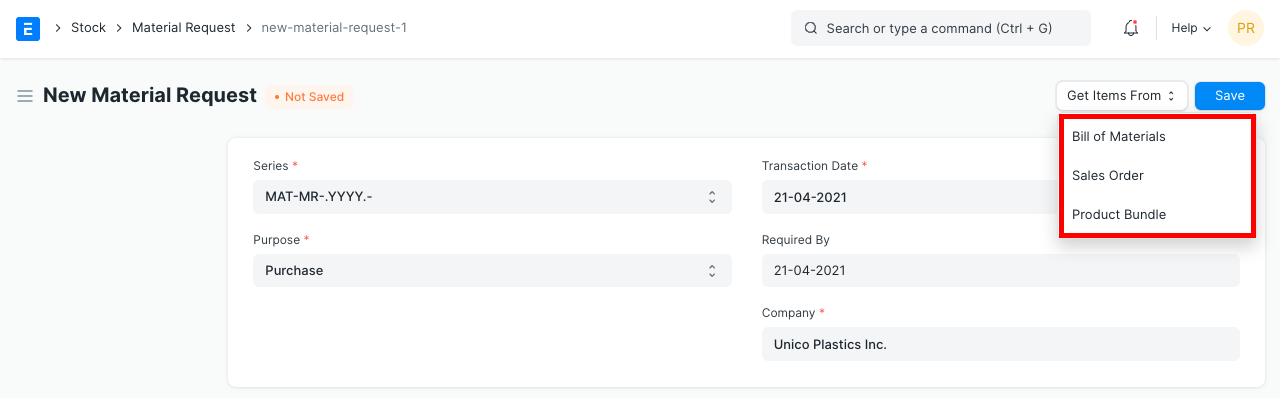
Set the quantity after choosing the item.
Choose the Warehouse for which the relevant items are needed.
Each item in this table has a Needed By date that you can modify.
Publish and save.
1.1 Alternate ways of creating a Material Request
An automatic Material Request generator is available:
the way of a sales order. The user has the option to either ignore or add Projected Quantity while constructing MR. As a result, MR is fetched with the sales order items.
When a certain level is reached by the Projected Amount of an Item in Shops (Warehouses).
Organize your industrial operations with a production schedule.
You must also identify the Warehouse where you anticipate receiving your Goods if they are inventory items. This makes it easier to monitor the item's projected quantity.
Information: Requesting materials is optional. The best scenario is to have centralized purchasing so you can gather this data from many departments.
1.2 Statuses
The following statuses are possible for a Material Request:
Draft: The system has not yet received a draft that has been stored.
Submitted: The system receives the document.
Stopped: The material request can be terminated if no additional items are required.
Canceled: The request is canceled since the items are not at all required.
Pending: To fulfill the material request, the purchase or manufacture is still pending.
Partially Ordered: Some of the items from the material request have purchase orders, while others are still pending.
Ordered: Purchase Orders are used to place orders for every item in the material request.
Issued: A Material Issue Stock Entry is used to release the materials.
Transferred: With a stock entry, the necessary materials are moved from one warehouse to another.
Received: With a purchase receipt, the materials were ordered and delivered to your warehouse.
2. Features
2.1 Items table
Barcode: By employing barcodes, you may track Things.
The item master will be queried to retrieve the item code, name, description, image, and manufacturer.
Scan Barcode If you have a barcode scanner, you can add items to the items table by scanning their barcodes. For further information, consult the barcode tracking documentation for products.
It will obtain the UoM, conversion factor, and amount. You alter the Warehouse that is receiving the material request.
The Items can have accounting information like Expense Account and Accounting Dimensions specified.
When printing, Page Break will insert a page break just before this item.
2.2 Setting Warehouses
- Set Warehouse: The Warehouse where the requested Goods will be delivered is an optional setting. The 'For Warehouse' fields on the item table rows will receive this information
2.3 More Information
You can provide the Reference from which the material request was produced in the "Requested For" box.
2.4 Printing Details
Letterhead
Your Material Request can be printed on letterhead from your business. For more information, see the letterhead documentation.
Print Headings When printing the document, you can also alter the heads on the purchase receipt. This can be accomplished by choosing a Print Heading. Go to Home > Settings > Printing > Print Heading to add new print headings. Find out more here.
2.5 Terms and Conditions
There may be specific Terms and Conditions in Sales/Purchase transactions on the basis of which the Supplier supplies goods or services to the Customer. The Terms and Conditions can be applied to transactions, and they will show up when you print the paper. Click here to learn more about the terms and conditions.
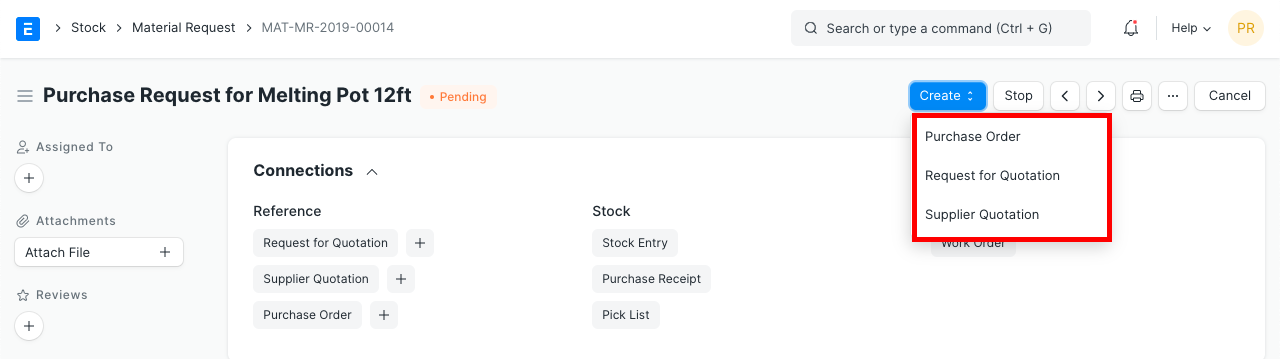
2.6 After Submitting
The following documents are available for creation:
- Request For Quotation
- Purchase Order
- Supplier Quotation
2.7 Automatically generate Material Requests
Setting the level in the Item form and turning on the setting in Stock Settings will cause Material Requests to be generated automatically. Setting a reorder will automatically generate material requests for the item when the stock level falls below a predetermined threshold.