Setting up Sendgrid SMTP Email in Geer ERP
Email can be sent from one server to another quickly and easily using the SMTP, or simple mail transmission protocol. With the help of SendGrid's SMTP service, you may distribute emails through our server rather than your client or server. Geer ERP has an integrated email client that is set up to allow you to send and receive emails there and, if necessary, add them to documents.
Integrating SendGrid's Web API Using an X-SMTPAPI header placed into the message, developers can give specific email handling instructions using SendGrid's SMTP API.
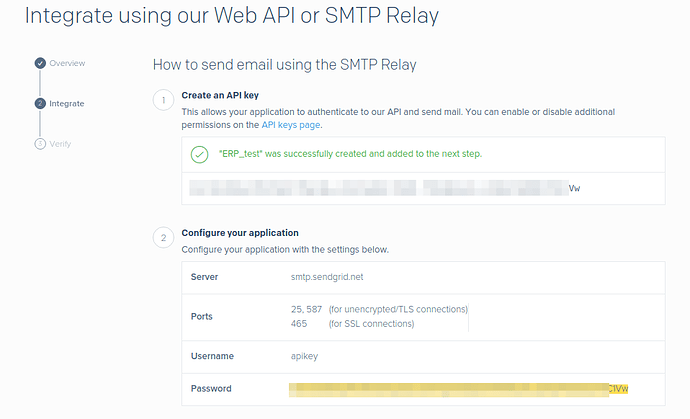
Step 1: To authenticate your application, you must create an API key. Geer ERP is used here. SMTP and SendGrid integration information may be found here.
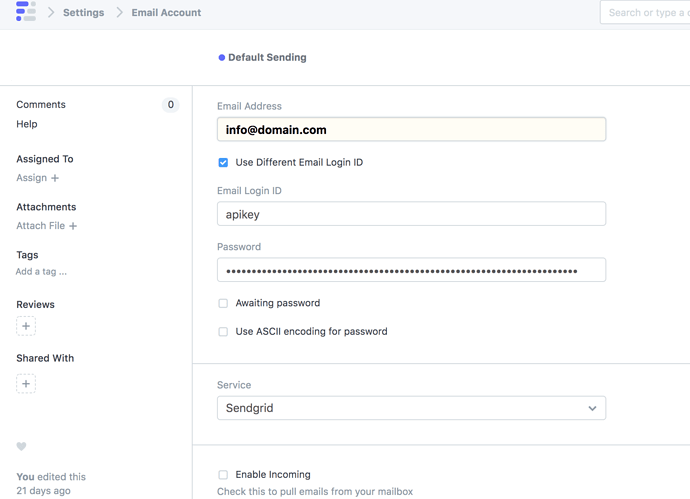
Step 2: You must specify your API key in your Geer ERP account > Create a New Email Account when it has been created.
Email Address: Your Email Address
Email Login ID: API Key [API key generated in Step 1]
Password: Your Password
Service: Select "SendGrid