Migrate To Perpetual Inventory
Migrate To Perpetual Inventory
The system has Perpetual Inventory Valuation turned on by default.
Please follow the instructions listed below if you're one of the users who presently uses the periodic inventory valuation system and wants to switch to the perpetual method.
1. How to Migrate to Perpetual Inventory
- Make sure the Stock in Hand Account is synchronized with the value of the real stock value in your Warehouse in order to support perpetual Inventory (s). You must make a journal entry for the differential amount against the expense account in order to sync it (generally used in Purchase Invoice).
For instance, you must have Expense (Cost of Items Sold) booked via Purchase Invoices if perpetual inventory was disabled. To transfer the value of the current stock from the expense account to the stock in hand account, you must now produce a journal entry.
The Cr. Expense Account is XXX.
Dr. Stock's account says XXX.
It can also work other-way round if you were selecting a stock in hand account in the Purchase Invoice.
- Make sure that the stock accounts (ledger) for the existing Warehouse are linked before allowing perpetual inventory. A warehouse's stock account can be configured on one of three levels.
within the Warehouse Master
Master Parent Warehouse
If you just keep one Stock-in-Hand account for all of the Warehouses, it will be the Default Stock in Hand Account in the Company Master.
- Journal entry for stock update Receiving but not billing a customer.
An adjustment account called "Stock Received But Not Billed" indicates the value of the stock for which a Purchase Receipt has been submitted but no Purchase Invoice has yet been generated. To update the value of the open Purchase Receipt that is pending billing into the "Stock Received but not Billed" account, a Journal Entry should be made.
You can consult the report "Received Items Waiting for Billing" in the Accounts module to learn the worth of the merchandise that has been received but not yet billed.
To amend the value in the Stock Received But Not Billed account, create a journal entry as shown below.
Receiving of stock but not billing it. XXX
Dr. Cost of Goods Sold (COGS).................. XXX
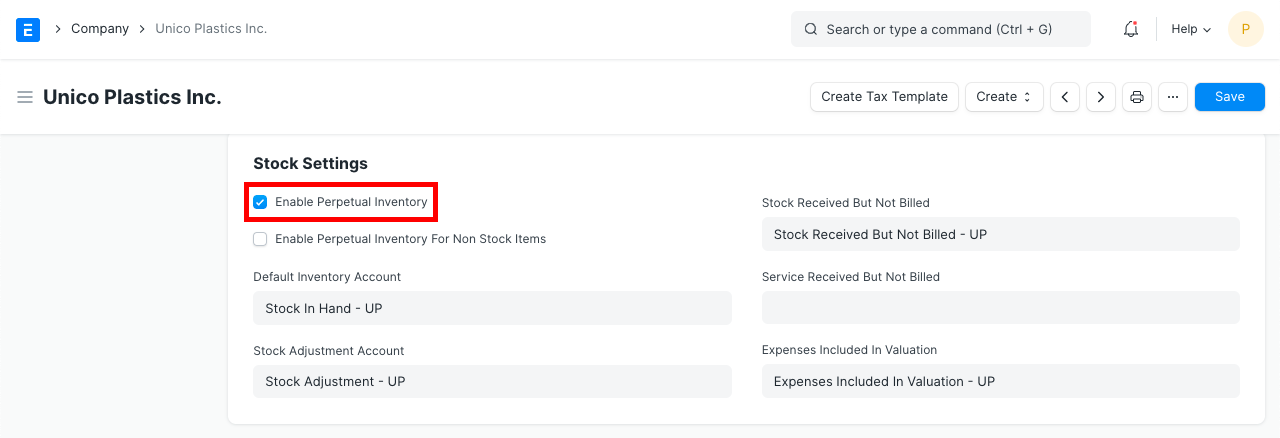
- For each Company, set up the following default accounts.
Stock Received But Not Billed
Stock Adjustment Account
Expenses Included In Valuation
Cost Center
Activate Perpetual Inventory
- Go to: Home > Accounting > Company