Bulk Update
Bulk Update allows you to update a particular field of a DocType for all documents.
Go to: to access Bulk Update.
Home > Settings > Bulk Update
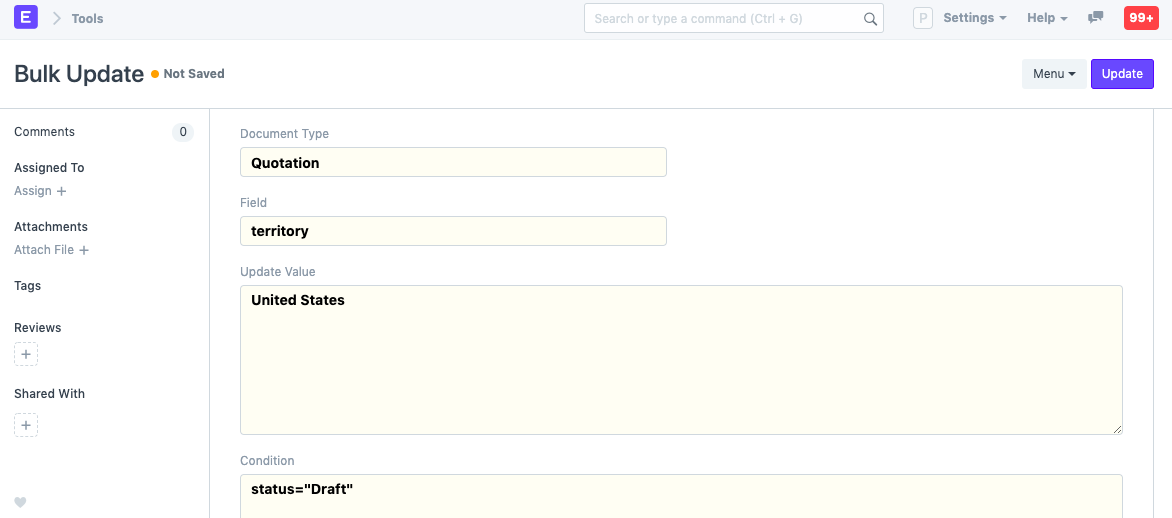
Take the case where you previously selected "All Territories" for 20 quotations and now wish to alter the Territory to France. You can use Bulk Update to update all 20 quotations at once rather than updating each one individually.
To do this,
- Select Bulk Update.
- Choose a document type, such as quotation.
- To update a field, such as territory, choose it.
- To update, enter a true new value.
- Add any exclusions that apply; for instance, status="Draft" will only have an impact on papers that are still in the Draft stage.
- Choose the number of papers (Quotations) that can be modified as the limit.
- Select Update.
Note: You can only update fields that can be updated normally in a particular stage. For example, valid till date cannot be updated for submitted Quotations.