Inter Company Invoices
Inter Company Invoices A journal invoice known as a "inter company" is sent between groups of organizations. You can produce interconnected invoices for many firms in addition to making sales or purchase invoices for a single business.
As an illustration, you could generate a purchase invoice for Business ABC, create a sales invoice for Company XYZ against this purchase invoice, and link the two together.
1. How to create Inter Company Invoices
1.1 Setting up
1.Go to: Accounts > Masters > Customer. 2.Select the Customer who you would want to choose for the inter-linked invoice. 3.Enable the checkbox, Is Internal Customer shown as follows:
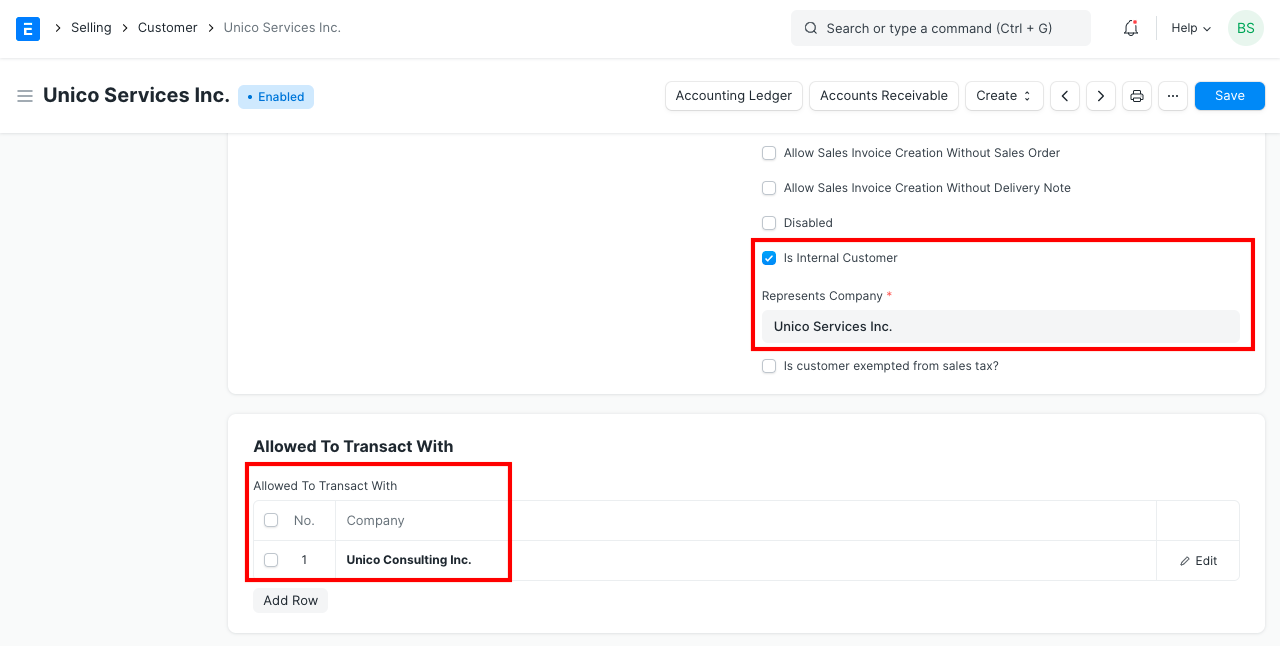
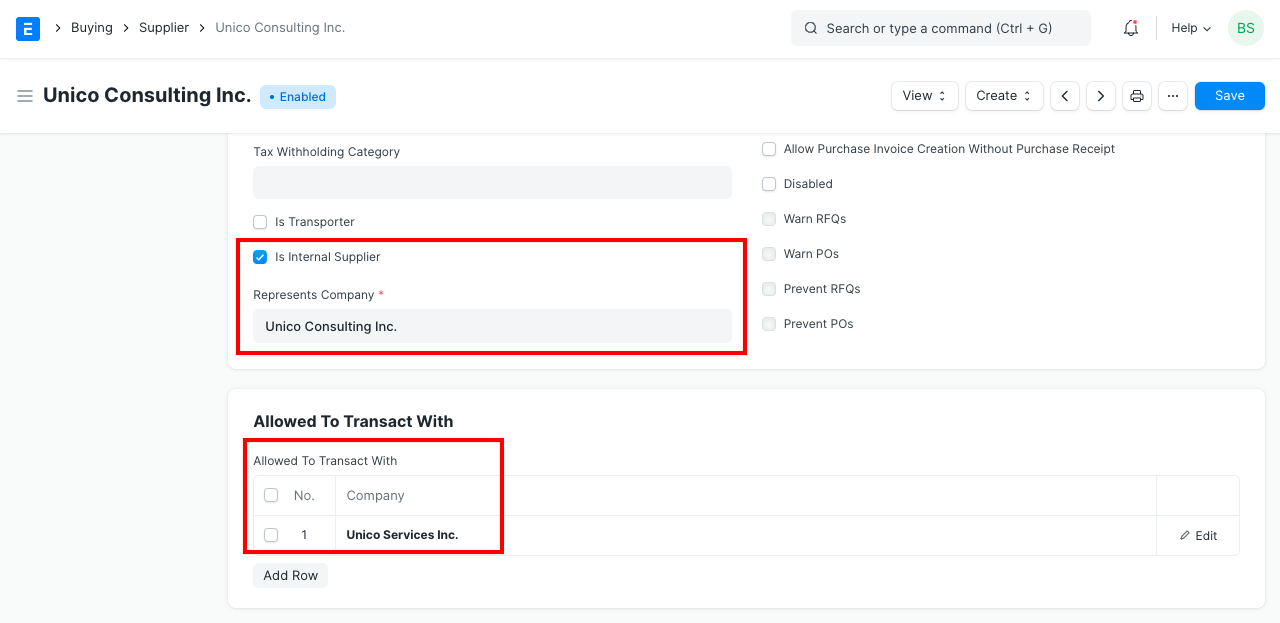
1.Add the company which the Customer represents in the Represents Company field. This the company for which the Sales Invoice will be created. 2.In the Allowed To Transact With table, add the company against which you will be creating a Purchase Invoice. 3.Now, when you create a Purchase Invoice against company A (customer is from company B, the seller is company A), it'll be linked to the Sales Invoice for company A created using this Internal Customer from company B. 4.Now, you need to follow a similar procedure for setting up a Supplier for inter-linked invoices. 5.Go to: Accounts > Masters > Select the Supplier 6.Tick on Is Internal Supplier. 7.In the Represents Company field, add the company which you added in the table Allowed To Transact With for the Customer. 8.In the table Allowed To Transact With for the Supplier, add the company which the Customer represents. This is the company against which you are going to make an inter-linked Purchase Invoice. 9.Here is a screenshot of the Supplier company to avoid any confusion:
1.2 Creating the Invoice
1.Now, create a new Sales Invoice, fill up the fields. 2.Remember to select the Customer who is an internal customer and company from which he's buying. 3.Save and Submit the Invoice.
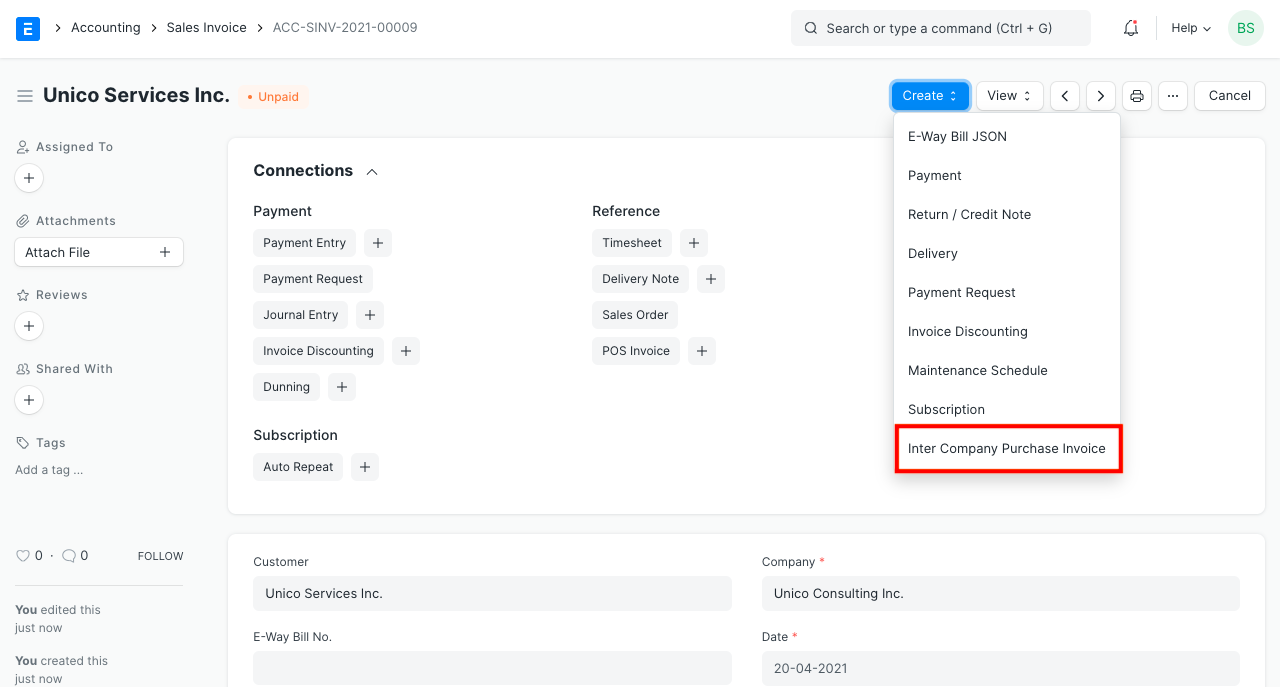
4.Before you make an Inter Company Invoice you need to do the following:
1.The selling and buying price between the companies should be in sync. 2.Go to Stock > Price List, create a new Price List for inter company transactions. 3.Tick both Selling and Buying in this new Price List. 4.Go to Buying > Supplier > internal supplier, in the currency and price list section, set the price list to the new one just created. 5.Do the same for the internal customer, i.e., set the price list to the new one. 6.Now, you can make an inter company Purchase or Sales Invoice.
5.Under the Make button dropdown, you will find a link Inter Company Invoice, on clicking the link, you will be routed to a new Purchase Invoice form page. 6.Here, the supplier and company will be auto-fetched depending on the company you selected in the Sales Invoice. 7.Remember: There can only be a single Internal Supplier or Customer per company. Submit the invoice, done! Now, both the invoices are inter-linked. Also, on canceling any of the invoices, the link will break as well.
The stock ledger will not be impacted by an intercompany invoice; only the accounting ledger would. This is due to the fact that the businesses are a part of the same corporate family.
Using the submitted Purchase Invoice as a starting point, you can use the same procedure to construct a Purchase Invoice and a related Sales Invoice.