Student Leave Application
Student Leave Application
To maintain track of a student's leaves, a formal document called a student leave application is used.
Go here: to access the list of student leave applications.
Home > Education > Attendance > Student Leave Application
1. How to create a Student Leave Application
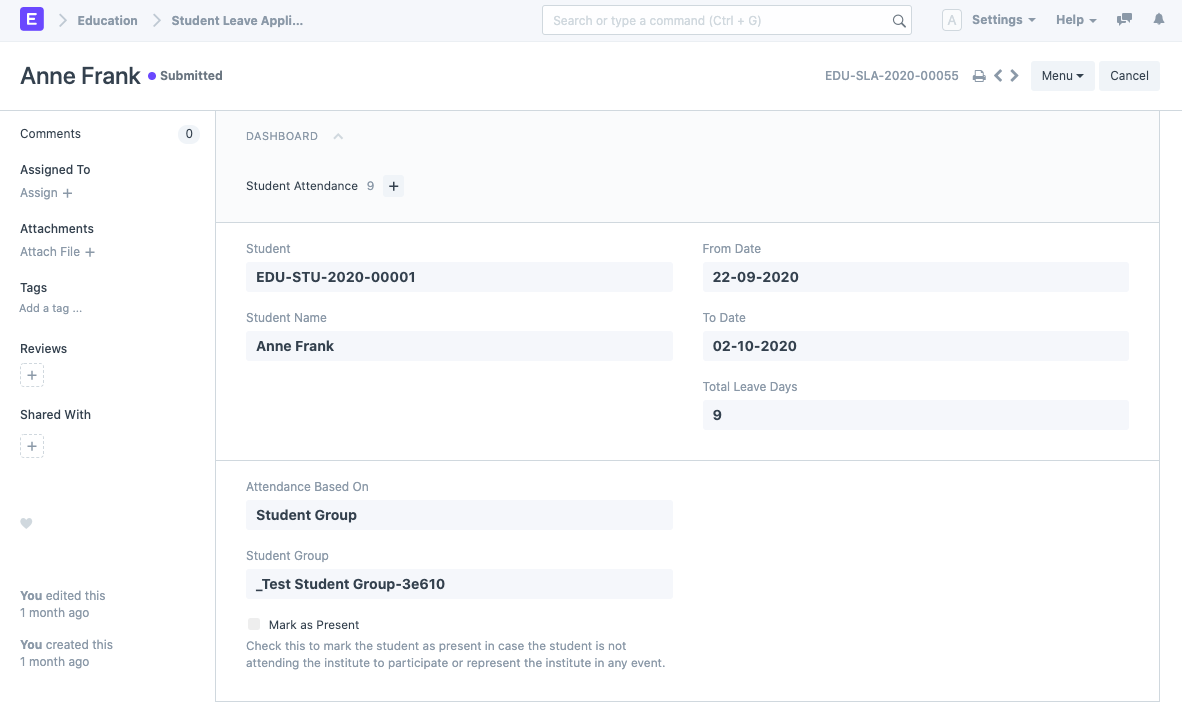
- Click New on the Student Leave Application list.
- Decide on a student.
- To determine the time frame, set the "From Date" and "To Date" variables appropriately.
- The "Attendance Based On" field determines how Attendance is marked for the Leave Application. Student attendance in ERPNext can be recorded in one of two ways:
- Course Schedule: In colleges and universities, if attendance is taken at every lecture, a leave application can be made for that specific course slot.
- Student Group: While taking daily attendance, the student group (class/division) is utilized to record attendance so that daily leave can be calculated.
Choose the Student Group or Course Schedule based on the Attendance column. You can also add a reason.
The student can be designated as "Present" from the Leave Application itself by checking Mark as Present if they are not attending the institute to participate or represent the institute in any event.
Save. After removing the holidays from your default holiday list, the document's "Total Leave Days" will be calculated and set.
1.2 On Submission of Student Leave Application
A student attendance record with the status "Absent" is immediately established after the student leave application has been submitted. The attendance record's status is set to "Present" if the box labeled Mark as Present is selected. This Student Attendance document has a link to the Leave Application for your convenience.

The production of the Student Attendance record for any date during the leave period that falls on a holiday is skipped.
1.3 On Cancellation of Student Leave Application
When a student leave application is canceled, an automatic cancellation of the associated student attendance record likewise occurs.