Quality Action
Quality Action I
ntroduced in Version 12
Following a quality review, a quality action is conducted to address or prevent poor outcomes.
Implementing corrective and preventative measures is made possible by the standard characteristic of quality action. This complies with rules set forth by the industry, such as GMP, ISO 9001 and 14001, TSCA, REACH, etc.
Quality Action workflows guarantee that predetermined solutions and processes are followed, which creates a controlled environment and lowers the possibility of repeating problems.
For a quality goal or customer feedback that might not satisfy the desired quality standards, quality actions can be initiated. A Corrective or Preventative Action can be initiated based on that.
Go to: to access Quality Action.
Home > Quality > Review and Action > Quality Action
1. Prerequisites
It is suggested to first create the following before generating and using a quality action:
- Quality Review or Quality Feedback
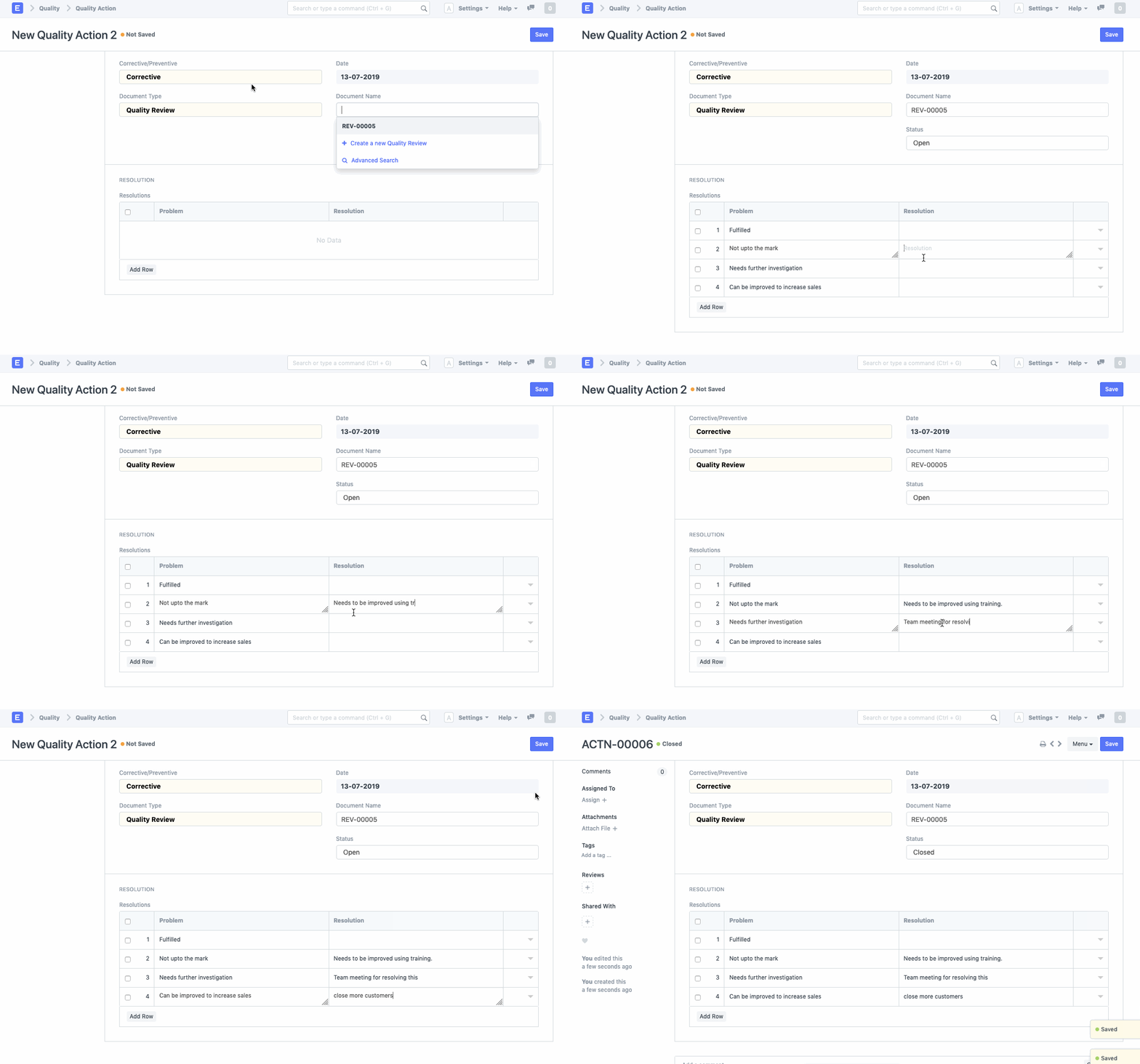
2. How to create a Quality Action
Click New in the Quality Action list.
Choose if the activity is corrective or preventive. This identifies whether the planned intervention is corrective or preventive in nature.
Whether it is a quality review or quality feedback, choose the document type.
Under Document Name, choose the actual Quality Review or Feedback.
In the Resolve field, enter a solution to the issue.
Save.
The Quality Action's Open/Closed status can be seen in the Status box.