Asset Depreciation
Based on the depreciation method selected as well as additional relevant inputs like the asset record's "Available to Use Date," the system automatically generates a schedule for depreciation. For various Finance Books, it is also feasible to design several depreciation schemes. To calculate an asset's depreciation and add entries to the asset record's depreciation table, you must click the "Calculate Depreciation" checkbox when creating the asset.
Depreciation types in Geer ERP include:
- Straight line: A straight line formula is used to calculate depreciation, which is then uniformly dispersed throughout the chosen frequency in months. For instance, if an asset's current worth is $1,000 and its post-depreciation value is $500 after five years, a straight line would set a depreciation rate of $100 per year. When there is no clear pattern to how the depreciation occurs over time, this strategy can be helpful.
- Double Declining Balance: This is sometimes referred to as a falling balance of 200%. Each time this method is used, 20% of the current value is depreciated. As an illustration, if an asset is valued at $1,000, it will be worth $800 in the following period, 20% of $800 is $160, the asset is now valued at $640, and so on until the final value is reached. 10% depreciation will be calculated if the year is only getting started. This strategy is helpful when an asset depreciates quickly at first and then gradually over time.
Written Down Value: Over the course of the asset's life, the value of the asset depreciates by a certain percentage. This constant percentage is always determined using the asset's current market value. For instance, if the value is $1,000 and the "Written Down Value" is 10% over five years, 10% will be depreciated each year to arrive at the anticipated value of $600 at the end of the useful life. useful for autos whose depreciation rises over time.
Manual: You can specify the Schedule Date and Depreciation Amount for each period using this method.
1. Scheduled depreciation
The system makes a depreciation entry by making a journal entry on the planned date, and the same journal item is referenced in the depreciation table. On submission of the depreciation entry, the Next Depreciation Date and Current Value are both updated.
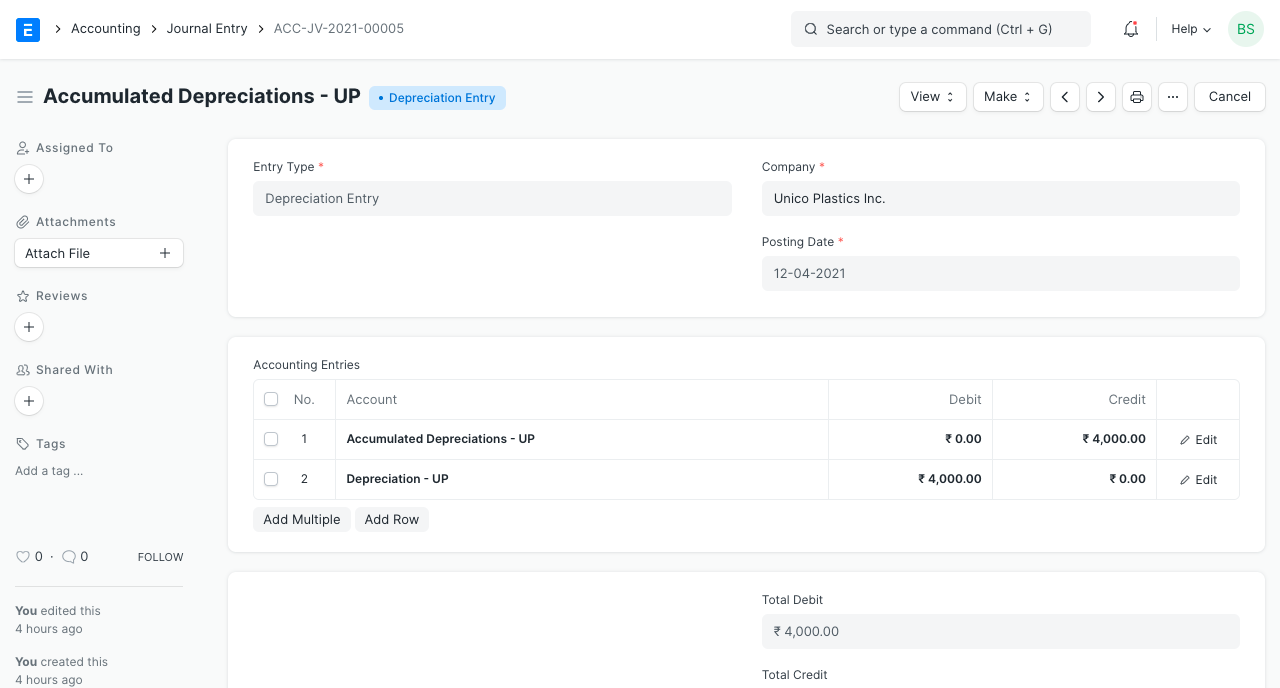
2. Accounting entries on depreciation
In the depreciation entry:
- It credits the "Accumulated Depreciation Account"
- It debits the "Depreciation Expense Account."
It is possible to set the relevant accounts in the asset category or company.
3. Automatic depreciation entries
From Accounts Settings, you can turn on automatic depreciation entry booking. By using the scheduler, this will automatically create a depreciation item on the designated date. If not, you must manually create the journal entry by selecting "Make > Depreciation Entry" in the appropriate Depreciation Schedule row.

4. An example
A line graph depicting the asset's net value on various depreciation dates will aid in understanding.
